Assine
Status
Views
0 views
Overview
A next-generation task management app that unifies your schedule and tasks in one place, with AI assistant integration.
Details
💡 Background & Motivation
While using existing task management apps, I kept running into the same problem: "meetings" and "tasks to prepare for those meetings" were managed separately, making the connection between them hard to see. I'd often realize a meeting's prep tasks weren't finished right before it started, which made it clear that a tool that manages tasks and schedule together was needed.
Another problem was that, despite how widespread AI assistants have become, task management tools still can't talk to them. Asking "what are my tasks today?" still means having to open the app yourself. To close that gap, I built Assine as a task management app that supports MCP (Model Context Protocol), so it can be operated directly from Claude.
⚡ Key Features
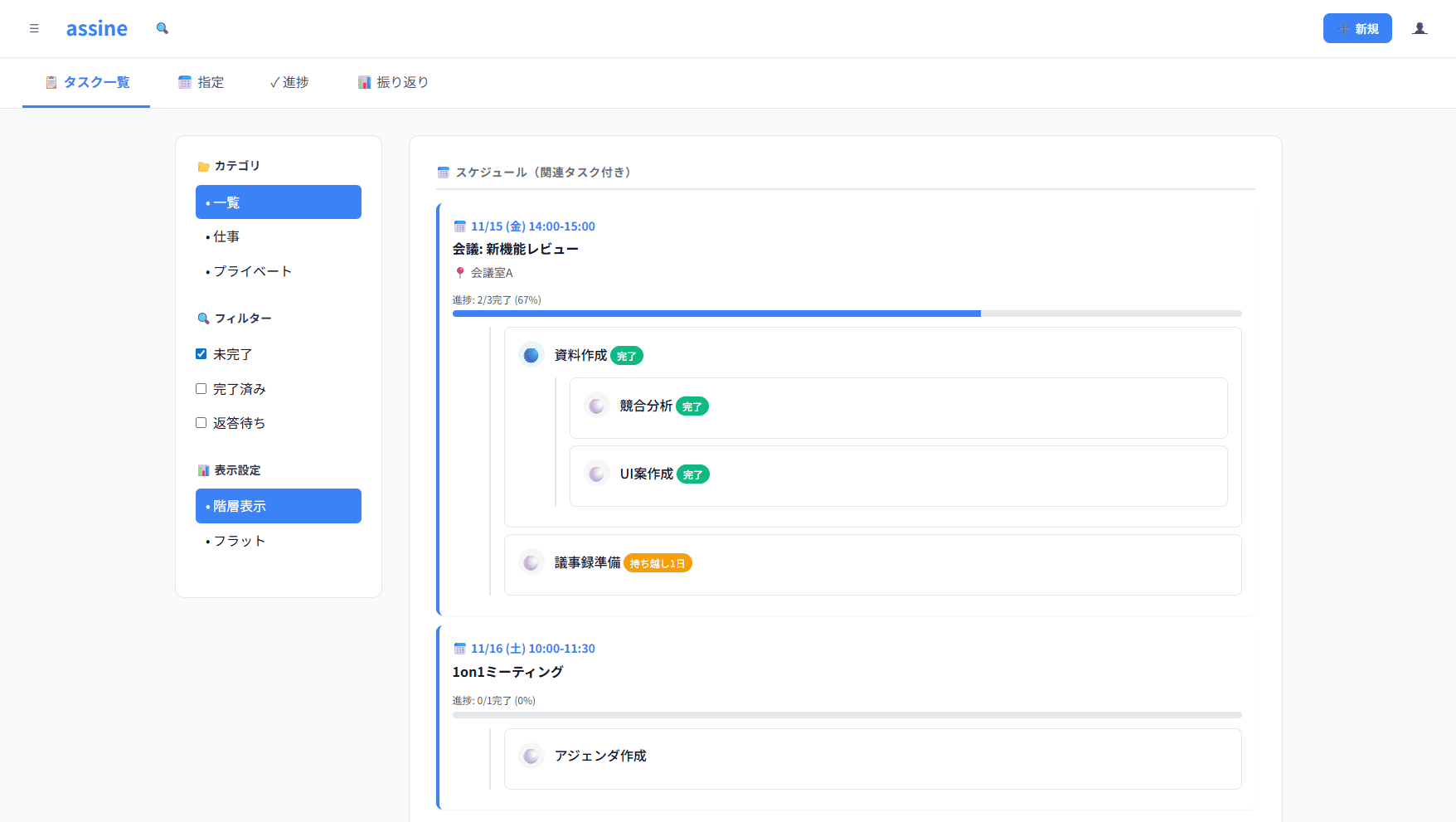
Integrated Schedule–Task Management (Core Feature)
Attach tasks directly to schedule items to manage prep work in one place
Automatically calculates and visualizes progress on tasks tied to a schedule item
Shows a warning before a meeting starts if there are unfinished tasks
Automatic Hierarchy Detection
Automatically classifies tasks as light, medium, or heavy based on how deeply they're nested
Automatically adjusts the time frame — light tasks by day, medium tasks by week, heavy tasks by month
Lets users structure tasks naturally without having to think about hierarchy
Four-Page Layout
Tasks: visualize and edit the task hierarchy
Plan: assign tasks to specific days, weeks, or months
Progress: log execution and progress for today and this week
Review: analyze past performance and get improvement suggestions
AI Integration (MCP Support)
Create, view, and update tasks directly from Claude Desktop
Natural-language commands like "what are my tasks today?" or "create prep tasks for tomorrow's meeting"
Built by wrapping a REST API as an MCP Server, with ChatGPT and Gemini support planned
PWA & Offline Support
Add to your home screen for a native-app-like experience
Full functionality offline — creating, editing, and updating progress on tasks all work without a connection
Automatic sync when back online, with built-in conflict detection and resolution
🛠 Tech Stack
| Category | Technology |
|---|---|
| Frontend | React 19 / Next.js 15 (App Router) / TypeScript |
| Styling | Tailwind CSS / shadcn/ui |
| State management | Zustand |
| Backend | Supabase (PostgreSQL / Auth / Realtime / Edge Functions / RLS) |
| Hosting | Vercel |
| PWA | Service Worker / IndexedDB / Dexie.js |
| AI integration | MCP Server / REST API |
| Payments | Stripe |
| External integrations | Google Calendar API / Microsoft Graph API |
🔧 Technical Highlights & Design Decisions
Data Design for Linking Schedules and Tasks
The tasks table has both a parent_task_id and a parent_schedule_id, with a mutually exclusive constraint limiting each task to being a child of either a regular task or a schedule item — never both. Schedule-linked tasks are also capped at two levels deep, which keeps the data model simple while still allowing flexible linking.
Automatic Hierarchy Detection Algorithm
When a task gains a child, it's automatically promoted to a medium task; when a grandchild is added, it's promoted further to a heavy task. Demotion is handled the same way automatically, so users can structure their tasks naturally without ever thinking about hierarchy levels.
API Design Built with MCP in Mind
With a future MCP Server in mind, the RESTful API is designed around resources — for example, GET /api/tasks and POST /api/schedules/:id/tasks — so that it can be converted into MCP tools with minimal friction.
Offline-First Design
A local database is built with Service Worker + IndexedDB (Dexie.js). While offline, the app runs entirely on this local database, so every feature keeps working even if an auth token has expired. When the app comes back online, a timestamp-based conflict resolution algorithm handles syncing.
Leveraging Row Level Security (RLS)
Supabase's RLS ensures each user can only access their own data, and shared-group data is restricted to group members only — so the design prevents data leaks even if a frontend bug were to occur.
📊 What Sets It Apart
| Aspect | Existing Apps (Notion, Todoist, etc.) | assine |
|---|---|---|
| Schedule–task linking | Not supported (managed separately) | Tasks can be attached directly to a schedule item |
| Hierarchy management | Set manually | Detected automatically from nesting |
| AI integration (MCP) | Not supported | Operable directly from Claude Desktop |
| Offline support | Limited | Full functionality |
| Japanese-language UX | Translation-based | Built natively for it |
🚀 Future Plans
Pro plan release: AI-powered analysis, automatic task generation, and schedule optimization suggestions
Support for ChatGPT GPTs / Gemini Extensions
Native app (iOS/Android) via React Native
Expanded team features and B2B offering