Kinroku
Overview
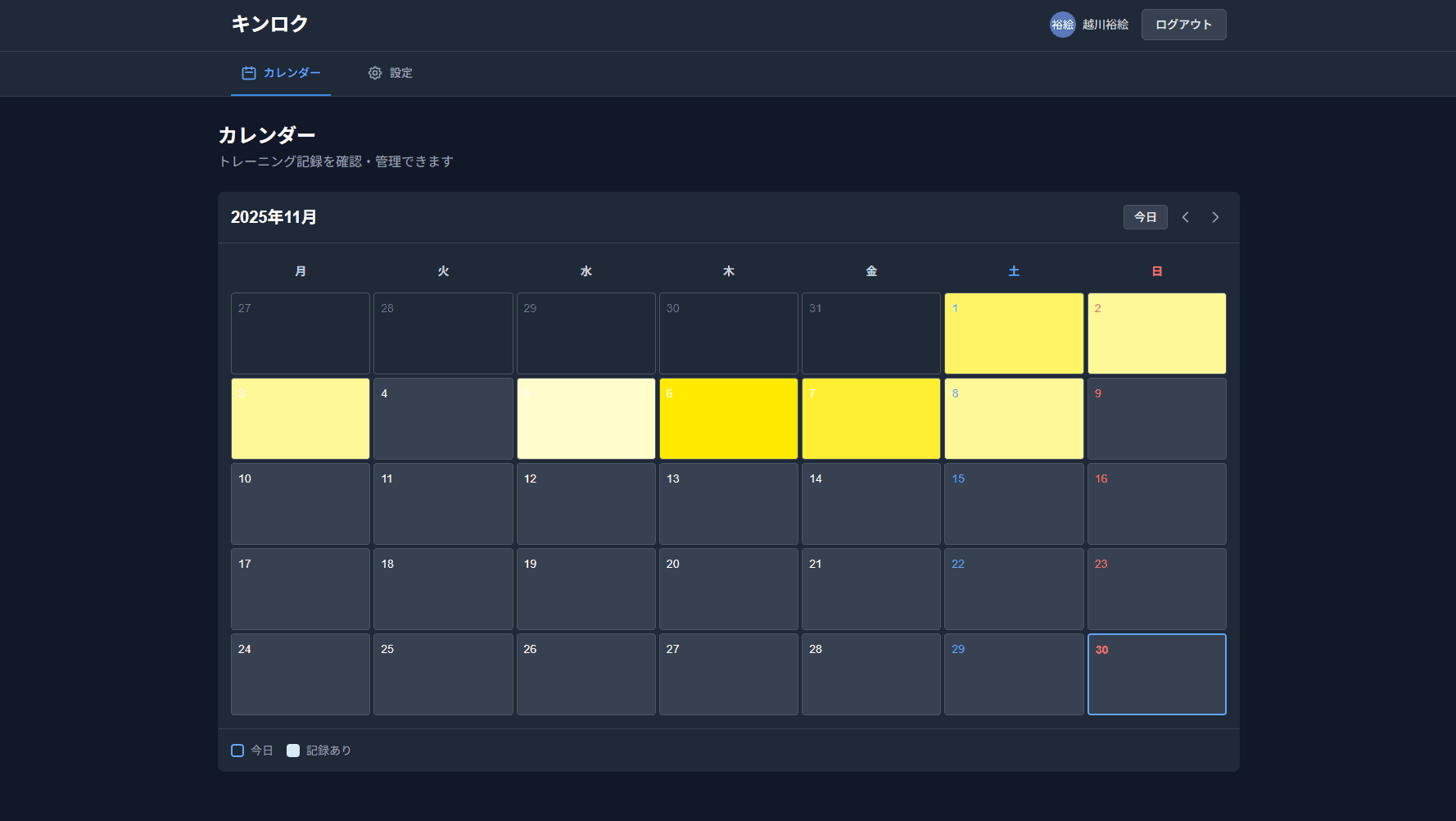
A workout tracking app that visualizes training intensity with color on a calendar. A PWA built with React, Next.js, and Supabase.
Details
💡 Background & Motivation
Keeping a record is essential for sticking with strength training, but most existing apps focus mainly on numbers and graphs. After researching eight major Japanese fitness apps (FiNC, Kintore Memo, Strong, and others), I found that even apps with a calendar view typically just mark workout days in a single color — no app visualized training intensity in gradual steps.
I built Kinroku around a simple visual idea — darker colors for harder days, lighter colors for easier ones — to make effort visible and turn that visibility into motivation to keep going.
⚡ Key Features
Calendar × Intensity Visualization (Core Feature)
Shows subjective intensity (1–5 scale) as color on the calendar
Automatically generates the in-between colors (levels 2–4) once you set colors for level 1 and level 5
See your monthly effort at a glance
Training Log
Log by body part, exercise, weight, reps, and sets
Track left/right sets separately (supports one-handed exercises like dumbbell curls)
Notes field for recording form cues and other observations
Customization
Freely add, edit, and delete exercises and body parts
Register favorite exercises for faster logging
Toggle left/right tracking on or off
PWA Support
Add to your home screen for a native-app-like experience
Log data even while offline (syncs automatically once you're back online)
Start using it instantly from the browser — no app store required
🛠 Tech Stack
| Category | Technology |
|---|---|
| Frontend | React 18 / Next.js 14 (App Router) / TypeScript |
| Styling | Tailwind CSS |
| State management | Zustand |
| Backend | Supabase (PostgreSQL / Auth / Row Level Security) |
| Hosting | Vercel |
| PWA | next-pwa / Service Worker |
🔧 Technical Highlights & Design Decisions
Automatic Color Gradient Generation
Implemented a feature that generates a 5-step gradient from just two user-specified colors. Interpolation is calculated in HSL color space to produce a natural-looking gradient.
Data Design for Left/Right Tracking
Left/right tracking is managed per exercise via a flag, with a side column ('left' | 'right' | null) added to the sets table. This design keeps the impact on existing logging features to a minimum while leaving room for flexible extension.
Offline-First Design
Anticipating poor signal at the gym, the app keeps a local cache in IndexedDB and syncs with Supabase once back online, reducing the risk of data loss.
Leveraging Row Level Security (RLS)
Supabase's RLS ensures each user can only access their own data, so the design prevents data leaks even if a frontend bug were to occur.
Responsive Design
Designed mobile-first, with the calendar UI optimized for tap interaction. Runs from the same codebase on desktop as well.
📊 What Sets It Apart
| Aspect | Existing Apps | Kinroku |
|---|---|---|
| Calendar display | Marks workout days in a single color | Represents intensity with a 5-step color scale |
| Color customization | Fixed or limited | Auto-gradient from 2 chosen colors |
| Left/right tracking | Not supported | Supported (toggle per exercise) |
| PWA support | Almost none | Full support (works offline) |
🚀 Future Plans
Graph view for training volume (total load)
1RM progression graphs by exercise
Social sharing (share your calendar as an image)
Data export (CSV format)